
To improve Google Ads lead quality, optimize for meaningful enquiries and qualified sales outcomes—not just clicks or a higher number of conversions. Start with the goals used for bidding, fix inaccurate tracking, send qualified-lead outcomes back to Google Ads, and make your ads clear about who your service is for.
If your campaigns generate enquiries but few useful sales conversations, increasing the budget may simply increase the same problem. First identify whether you are attracting the wrong people, measuring the wrong actions, or losing suitable prospects during follow-up.
This guide explains five practical improvements for business owners and advertisers. Most examples apply to Search campaigns; available controls differ across Search, Performance Max, and other campaign types.
What is a high-quality lead in Google Ads?
A high-quality lead is a genuine prospect who needs what you offer, fits your service criteria, and has a realistic opportunity to become a customer. A form submission alone does not establish that.
Agree on a simple definition with your sales team. For example, a qualified enquiry might need to meet these conditions:
- The person is enquiring about a service or product you actually provide.
- The location is within your service area.
- The contact details are valid and the requirement is genuine.
- The budget, timeline, or eligibility meets your business requirements.
Keep “not contacted yet” separate from “not qualified.” A missed call or unanswered first attempt does not prove that an enquiry was irrelevant.
1. Choose conversion goals that reflect real business value
Check which conversion goals each campaign uses for bidding. A WhatsApp button click, successful enquiry submission, and qualified sales opportunity represent different levels of intent.
Separate useful outcomes from engagement signals
A WhatsApp click confirms that someone clicked a button. It does not confirm that they sent a message or discussed a genuine requirement. Similarly, a phone-link click is not proof of a connected call.
- Potential bidding goals: verified enquiry submissions, meaningful calls, or imported qualified leads, depending on tracking reliability and available data.
- Observation metrics: button clicks, page engagement, and other preliminary actions that help explain the customer journey.
In standard conversion goals, primary actions can inform bidding when the campaign uses their goal; secondary actions are normally observation-only. Exception: actions included in a custom goal can be used for bidding even when marked secondary. Review custom goals carefully. See Google’s conversion goals documentation.
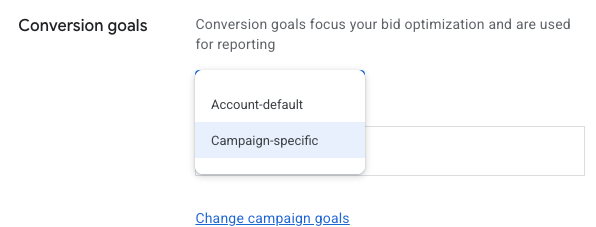
Use campaign-specific goals when the campaign needs different outcomes
Campaign-specific goals are useful when a campaign should optimize toward a different outcome from the rest of the account. They are not automatically better than account-default goals. If the same meaningful goals apply across campaigns, consistent account-default goals may be appropriate.
For example, a consultation campaign may need a different goal from a campaign selling a course online. Choose the goals that match each business objective, and allow for a learning period after changing them. Google’s campaign-specific goals guide explains the options.
2. Fix conversion tracking and duplicate counting
Before trusting reported cost per lead, test what actually triggers each conversion. If the tag fires when a visitor clicks Submit—even when the form fails validation—the campaign is receiving misleading data.
Track successful actions
- Trigger form conversions only after a confirmed successful submission.
- Check whether refreshing a thank-you page records another conversion.
- Test mobile forms, call buttons, and WhatsApp links separately.
- Compare tracked enquiries with real form entries and your CRM.
- Check whether the same enquiry is tracked through both a Google Ads tag and an imported GA4 event.
Understand what “Count: One” actually does
For lead-generation conversion actions, the One setting is often suitable when you want to count one conversion per ad click for that action. It does not mean one unique person forever, and it does not automatically remove duplicates across separate conversion actions or tracking sources.
If the same form submission is recorded as two primary conversion actions, selecting One on both will not resolve that duplication. Choose the intended bidding action and fix overlapping tags or imports. Purchases may need the Every setting when each transaction has value. Read Google’s conversion counting guidance.
Also protect forms against obvious spam with appropriate validation and anti-spam controls. An accurately tracked spam submission is still a poor business outcome.
3. Import qualified-lead and sales outcomes from your CRM
Google Ads can report the initial enquiry while your CRM records what happened afterward. Connecting those stages helps you evaluate which campaigns produce useful opportunities.
Send outcomes, not just a list of contacts
Offline conversion imports and Customer Match serve different purposes. An offline conversion import links an outcome, such as qualification or a sale, to an eligible ad interaction. Customer Match uses eligible first-party contact data to create an audience; uploading a customer list does not, by itself, report which enquiries became qualified leads.
Google supports qualified-lead and converted-lead goals for measuring later stages of the sales process.
- Define stages: new enquiry, qualified lead, opportunity, and customer.
- Record consistent outcomes: include rejection reasons such as wrong service, outside location, spam, or insufficient budget.
- Connect a supported data source: use Google Ads Data Manager or a suitable CRM integration, depending on your setup.
- Verify matching and diagnostics: check that uploads are accepted and attributed correctly.
- Select the bidding outcome deliberately: use reliable, sufficiently frequent data and account for the delay between enquiry and qualification.
Use enhanced conversions for leads where appropriate
Enhanced conversions for leads can improve attribution using first-party information, such as email addresses or phone numbers, alongside the required tagging and outcome imports. It does not automatically decide whether a lead is qualified or pull all CRM outcomes without a configured connection.
Follow Google’s customer-data policies and applicable consent requirements. Review its current enhanced conversions for leads guidance before implementation.
Do not assume that the deepest funnel stage is always the best immediate bidding goal. If sales are infrequent or take months, a consistently defined qualified-lead stage may provide more timely feedback. Test the change and judge it against sales outcomes.
4. Write relevant ads and qualify visitors on the landing page
Your ad is the first opportunity to set expectations. Explain the service clearly enough that a prospect can decide whether it matches their need before clicking.
Make the offer specific
For example, “Grow Your Business Today” gives little context. “Google Ads Management for Real Estate Businesses” explains both the service and the intended customer. An education advertiser should clearly use terms such as “classes,” “course,” or “institute” when those accurately describe the offer.
- Name the actual service, product, or course.
- Mention the service location when relevant.
- State important eligibility or budget requirements when accurate.
- Use a CTA that matches the landing page, such as “Discuss Your Requirement” or “Enquire About the Course.”
- Avoid vague promises, unsupported claims, and offers the page does not provide.
CTR still matters as a measure of engagement, but a higher CTR does not prove better lead quality. Assess it alongside qualified-lead rate, cost per qualified lead, and sales.
If essential wording must appear in a responsive search ad, consider pinning it to an appropriate position. Pin selectively because it reduces the combinations Google can test. No headline or pinning choice guarantees that only suitable prospects will click.
Continue the same message after the click
The landing page should explain the same offer, audience, and next step as the ad. Add a small number of useful qualifying questions—for example, service needed, location, or project budget—where they help your sales process. Avoid making the form unnecessarily difficult.
A clear form title such as “Discuss Your Hospital Planning Project” can set more accurate expectations than a generic “Get Details,” provided that is the service being advertised.
5. Refine search intent and use audience exclusions carefully
Audience exclusions can help in suitable situations, but they are not a universal filter for job seekers or irrelevant enquiries.
Review search terms and negative keywords first
For Search campaigns, inspect the actual queries attracting clicks and compare them with lead feedback. If you sell a service, job-related queries may be irrelevant; if you sell job-oriented training, some of those searches may be valuable.
- Add negative keywords based on your business and observed irrelevant intent.
- Review match types and query relevance rather than assuming exact match means identical wording only.
- Check service locations and location options against where you can actually serve customers.
- Compare performance by network, device, and location before making exclusions.
Negative keywords do not automatically cover close variants, and excessive negatives can block useful traffic. Refer to Google’s negative keyword guidance.
Exclude eligible first-party audiences when there is a business reason
For an acquisition-only campaign, excluding an eligible existing-customer or previous-converter segment may be appropriate. However, repeat customers and previous enquirers can still be valuable, so avoid blanket exclusions across the account.
Available exclusion controls depend on the campaign and segment type. Do not assume that every affinity or in-market segment available for observation can also be excluded in Search. Exclusions also do not identify every individual with certainty. Check the options shown in your account and Google’s audience exclusion guidance.
In Performance Max, audience signals guide the system; they are not strict audience targeting boundaries. Use the controls available for that campaign type rather than applying Search instructions unchanged.
How to measure whether lead quality is improving
Use a weekly review shared by your advertising and sales teams. Track:
- Qualified-lead rate: qualified leads ÷ total leads × 100.
- Cost per qualified lead: ad spend ÷ qualified leads.
- Lead-to-customer rate: new customers ÷ total leads × 100.
- Rejection reasons: wrong service, location mismatch, spam, duplicates, or other defined reasons.
- Follow-up: time to first response and whether a meaningful conversation occurred.
Illustrative example, not client results: Campaign A spends ₹20,000 and generates 100 leads, of which 10 qualify. Its cost per lead is ₹200, but its cost per qualified lead is ₹2,000. Campaign B spends the same amount and generates 50 leads, of which 20 qualify. Its cost per lead is ₹400, but its cost per qualified lead is ₹1,000.
Campaign B produces qualified leads at half the cost despite its higher headline CPL. Compare equivalent time periods, allow for qualification delays, and use the same qualification criteria. Track duplicate contacts consistently so they do not distort your CRM totals.
Google Ads lead-quality checklist
- Agree on a written definition of a qualified lead.
- Review the conversion goals used for bidding.
- Test tracking and remove overlapping conversion actions.
- Record sales feedback and import relevant outcomes.
- Align keywords, ads, landing pages, and qualifying questions.
- Review search terms and use exclusions with evidence.
- Measure qualified-lead costs and customers, allowing for the sales cycle.
Frequently asked questions
Why am I getting low-quality leads from Google Ads?
Common causes include mismatched search intent, vague ads, unclear landing pages, spam, inaccurate tracking, and bidding toward shallow actions. Review actual enquiry feedback alongside your campaign reports before deciding which cause applies.
Is a form submission better than a WhatsApp conversion?
It depends on what you measure. A successfully submitted form with useful qualifying answers provides more information than a WhatsApp button click. However, a verified, relevant WhatsApp conversation can be more valuable than a spam form entry. Measure the genuine outcome wherever possible.
Should I switch off broad match or Performance Max to improve quality?
Neither should be judged by lead volume alone. Compare qualified outcomes, tracking reliability, search intent where visible, and campaign controls. If a campaign generates poor enquiries, investigate and test changes before assuming the campaign type itself is the cause.
How long does it take to improve lead quality?
There is no fixed timeframe. Tracking fixes may change reporting quickly, while bidding and qualification changes need enough new data and time for sales outcomes to appear. Evaluate results over a period appropriate to your conversion volume and sales cycle.
Can I guarantee high-quality leads by changing campaign settings?
No. Better settings and measurement can reduce avoidable waste, but lead quality also depends on your offer, market demand, website, competition, and sales follow-up. Judge improvements using qualified opportunities and customers.
Need help improving your Google Ads enquiries?
Start with an audit of your measurement and lead feedback before increasing spend. Anirup Technologies can help you review your campaigns and identify where irrelevant enquiries are entering the process. Learn about Google Ads expert Anil Singh or contact our team to discuss your requirements.

Anil Singh is the Founder of Anirup Technologies LLP and a performance marketing strategist with over a decade of hands-on experience in Google Ads, PPC management, SEO and lead generation. He helps businesses build search-focused marketing systems that improve visibility, attract qualified leads and support measurable growth.
With strong expertise in Google Ads, Meta Ads, conversion tracking, landing pages and WordPress-based SEO, Anil focuses on practical strategies that connect marketing spend with real business outcomes. His work is especially focused on helping businesses use paid search and performance marketing with better structure, clearer reporting and stronger ROI accountability.