
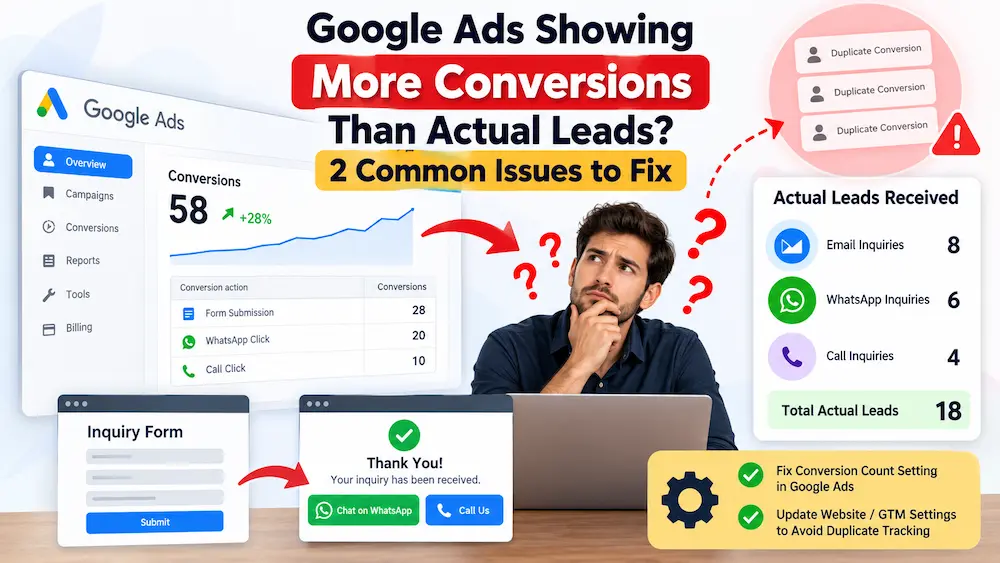
Google Ads Showing More Conversions Than Actual Leads? 2 Issues to Fix
You open your Google Ads account and see 25 conversions.
But when you check your email, WhatsApp messages, CRM or enquiry records, you can find only 15 actual leads.
So where did the other conversions come from?
This is a common Google Ads conversion tracking problem, especially for lead-generation campaigns where businesses track multiple actions such as enquiry forms, WhatsApp clicks and phone calls.
This isn’t just a reporting problem either.
If Google Ads believes your campaigns are generating more conversions than they actually are, your reported cost per conversion can look lower than your real cost per lead. If these actions are also being used for campaign optimisation, Google may make bidding decisions based on misleading conversion data.
As a performance marketing agency, we regularly look beyond dashboard conversion numbers and compare them with actual enquiries and lead quality. A high conversion count means very little if those conversions don’t represent genuine business opportunities.
Table of Contents
- Why Google Ads Shows More Conversions Than Actual Leads
- Issue #1: Conversion Count Is Set to Every
- Issue #2: Thank-You Page Creates Another Conversion
- How to Fix Duplicate Tracking Using Google Tag Manager
- Other Causes of Duplicate Conversions
- Recommended Lead Conversion Setup
- Frequently Asked Questions
Why Does Google Ads Show More Conversions Than Actual Leads?
Short answer: Google Ads can report more conversions than the number of actual enquiries you receive when the conversion counting configuration is incorrect or when the same prospect triggers multiple conversion actions during a single enquiry journey.
Two important areas should be checked first:
- Your lead conversion is configured to count Every conversion instead of One.
- A visitor submits an enquiry form and then triggers another conversion, such as a WhatsApp or Call click on your thank-you page.
The second issue is particularly important because changing the conversion count setting to One does not necessarily prevent different conversion actions from being recorded for the same prospect.
Issue #1: Your Google Ads Conversion Is Set to “Every”
When setting up a conversion action in Google Ads, you can choose how conversions should be counted.
The two important options are:
- Every: Multiple conversions can be counted after an advertising interaction.
- One: Only one conversion for that particular conversion action is counted after an advertising interaction.
When Does “Every” Make Sense?
Counting every conversion can make sense for an e-commerce business.
For example, imagine someone clicks a Google Ad and completes multiple purchases.
Those purchases have additional commercial value, so counting each purchase may correctly represent what happened.
Why Can “Every” Cause Problems for Lead Generation?
Lead generation works differently.
Suppose someone clicks your advertisement and submits the same enquiry form more than once.
Your business may not have received multiple new prospects.
You still have one person interested in your service.
If every submission is counted as another conversion, your Google Ads dashboard may show more conversions than the number of useful leads reaching your sales team.
Simple Example
| Activity | Google Ads May Report | Actual Business Leads |
|---|---|---|
| User submits enquiry form once | 1 Conversion | 1 Lead |
| Same user submits form again | Potential additional conversion | Still 1 Lead |
| Same user submits again | Potential additional conversion | Still 1 Lead |
What Should Lead Generation Advertisers Do?
Review the conversion action inside Google Ads and check its Count setting.
For most normal lead-generation actions, such as an enquiry form, counting One conversion per advertising interaction is generally more appropriate than counting every repeated submission.
Conversion tracking should also be reviewed as part of the wider campaign setup. Our Google Ads management scope, for example, includes form, call and CTA conversion tracking along with ongoing lead-quality analysis.
Important: “One” Does Not Mean One Lead Per Person Everywhere
This is one of the most important points to understand.
Selecting One does not necessarily mean Google Ads will understand that:
A person submitted a form, clicked WhatsApp and clicked the Call button, so all of these activities belong to the same lead.
The count setting applies to the individual conversion action.
Therefore, if you have separate conversion actions for:
- Form Submission
- WhatsApp Click
- Call Click
the same visitor can potentially trigger more than one conversion action.
This brings us to the second problem.
Issue #2: Your Thank-You Page Is Creating a Second Conversion
Let’s look at a very common landing-page setup:
Google Ad → Landing Page → Enquiry Form → Thank-You Page
A visitor clicks your ad, visits the landing page and completes the enquiry form.
The thank-you page opens and your conversion tracking records:
Conversion #1: Enquiry Form Submitted
Everything is correct up to this point.
But many businesses also have a WhatsApp or Call button on the confirmation page.
For example:
Thank you for your enquiry. Our team will contact you shortly. Need an immediate response? Chat with us on WhatsApp.
The visitor clicks the WhatsApp button.
Your tracking setup may now record:
Conversion #2: WhatsApp Click
Google Ads now sees two conversions.
But your business received an enquiry from only one potential customer.
The Customer Journey Looks Like This
| Step | User Activity | Conversion Recorded | Unique Leads |
|---|---|---|---|
| 1 | Clicks Google Ad | None | 0 |
| 2 | Visits landing page | None | 0 |
| 3 | Submits enquiry form | 1 | 1 |
| 4 | Visits thank-you page | Already recorded | 1 |
| 5 | Clicks WhatsApp | Another conversion may be recorded | Still 1 |
Why Is This Problem Difficult to Notice?
Technically, both tracking tags may be working correctly.
- The form conversion fired correctly.
- The WhatsApp conversion fired correctly.
The real problem is not necessarily faulty tracking code.
The problem is the conversion measurement logic.
You have effectively told Google that both actions represent separate new leads, even though the second action happened after the business had already captured the prospect.
Should You Remove WhatsApp or Call From the Thank-You Page?
Usually, no.
Removing WhatsApp or a phone option can negatively affect the customer experience.
A prospect who has just submitted an enquiry may want to speak to your business immediately.
Giving them a WhatsApp or Call option can therefore be useful.
The better approach is usually to fix your tracking logic rather than remove a useful communication option.
How to Fix Duplicate WhatsApp Conversions Using Google Tag Manager
If you use Google Tag Manager, you can configure your WhatsApp conversion tag so that it does not fire as another primary lead conversion after a form has already been submitted.
For example:
- Service/Landing Page → WhatsApp Click → Track WhatsApp Lead
- Thank-You Page → WhatsApp Click → Do Not Count Another Primary Lead
You can do this by adding an exception or additional condition to your Google Tag Manager trigger.
For example, if your thank-you page URL contains:
/thank-you/
you can configure the WhatsApp conversion trigger so it does not fire when:
Page Path contains /thank-you/
You Can Still Track Post-Form WhatsApp Activity
This does not mean you have to completely ignore what the visitor does after submitting the form.
You could create another analytics event such as:
Post-Form WhatsApp Engagement
and treat it as an engagement or secondary measurement rather than another newly acquired lead.
This allows you to understand customer behaviour without artificially increasing your main lead count.
Other Reasons Google Ads May Show Duplicate Conversions
The two issues above are among the first things I would check, but duplicate conversion reporting can have other causes too.
1. Google Ads and GA4 Tracking the Same Lead Separately
For example, you may have:
- A direct Google Ads conversion tag for Form Submission
- The same Form Submission imported from Google Analytics 4
If both are being treated as important bidding conversions, you should carefully review whether the same business action is being represented twice.
2. Duplicate Tags on the Website
Sometimes tracking is installed through Google Tag Manager while a WordPress plugin, theme, website developer or another integration also places conversion code on the website.
This can result in the same action firing more than once.
3. Multiple Contact Actions From the Same Prospect
A single prospect may:
- Submit your form
- Click WhatsApp
- Click your phone number
- Open another enquiry form
From a tracking perspective, these can be four actions.
From a sales perspective, they may represent one potential customer.
4. Thank-You Page Can Be Reopened
If your conversion tracking fires whenever a thank-you page loads, somebody refreshing or revisiting that page may cause tracking problems depending on your implementation.
Where possible, track the successful form submission event rather than depending only on a page view.
Google Ads Conversion vs Actual Business Lead
This distinction is extremely important for lead-generation campaigns.
A conversion is an action recorded by your tracking system.
A lead is an actual potential customer received by your business.
They aren’t automatically the same thing.
For example:
Google Ad → Form Submission → WhatsApp → Call
Your tracking configuration might record three different conversions.
But your sales team may still be speaking to only one prospect.
An experienced Google Ads specialist should therefore review not only campaign metrics, but also whether the underlying conversion data represents genuine enquiries and business outcomes.
How Duplicate Conversions Can Affect Your Google Ads Performance
Duplicate conversions can create several problems:
- Your reported conversion volume looks higher than reality.
- Your reported cost per conversion looks lower than your actual cost per lead.
- Campaigns, keywords or audiences may appear more effective than they really are.
- Automated bidding can receive misleading conversion signals.
- You may increase budget based on inaccurate performance data.
- Your actual sales team may report very different results from the Google Ads dashboard.
This is one reason our Google Ads management approach considers tracking accuracy and lead quality alongside campaign optimisation, search terms, bidding and budget decisions.
Example: How Duplicate Tracking Changes Your Real CPL
Suppose you spent ₹50,000 on Google Ads.
| Metric | Google Ads Dashboard | Actual Business Data |
|---|---|---|
| Ad Spend | ₹50,000 | ₹50,000 |
| Reported Leads/Conversions | 50 | 30 Unique Leads |
| Cost Per Lead | ₹1,000 | ₹1,667 |
Google Ads appears to be generating leads at ₹1,000 each.
But if the business actually received only 30 unique enquiries, the real cost per lead is approximately ₹1,667.
That is a major difference when making advertising and budgeting decisions.
Recommended Conversion Tracking Structure for Lead Generation
Instead of treating every website interaction as another equally valuable lead, structure your tracking around the real customer journey.
| Customer Action | Suggested Treatment |
|---|---|
| Successful enquiry form submission | Primary Lead Conversion |
| WhatsApp click without previous enquiry | Potential Primary Lead |
| Qualified phone call | Primary Conversion |
| WhatsApp click after form submission | Consider Secondary / Engagement tracking |
| Call click after form submission | Avoid automatically treating it as another new lead |
| Landing page view | Do not treat as a lead |
| General button click | Usually Secondary / Observation |
| CRM-qualified lead | Strong lower-funnel conversion |
| Confirmed sale/customer | Highest-value business outcome |
There isn’t one universal conversion setup that works for every business.
Your conversion configuration should depend on:
- Your website structure
- Your landing-page funnel
- How customers contact your business
- Your sales process
- What your team considers a genuine lead
- Whether you use a CRM
- Whether offline sales data is being sent back to Google Ads
How to Check Whether Your Google Ads Conversion Data Is Accurate
Don’t look only at the total conversion number in your Google Ads dashboard.
Compare Google Ads data with your actual business records.
Check:
- Google Ads conversions
- Website enquiry-form submissions
- WhatsApp conversations
- Phone enquiries
- CRM leads
- Qualified leads
- Sales or customers generated
If there is a large difference between Google Ads conversions and genuine enquiries, perform a conversion tracking audit before increasing your advertising budget.
This wider focus on measurement and commercial outcomes is also part of how Anirup Technologies approaches performance marketing, rather than evaluating campaign success only from clicks and platform-reported conversions.
Track Lead Quality, Not Just Conversion Quantity
The ultimate goal isn’t to generate the highest possible conversion number inside Google Ads.
The real objective is to generate useful business opportunities at an acceptable acquisition cost.
For example, Campaign A might report:
- 100 conversions
- ₹500 reported CPA
while Campaign B reports:
- 60 conversions
- ₹700 reported CPA
At first glance, Campaign A appears better.
But if Campaign A generates only 20 qualified leads while Campaign B generates 45 qualified leads, Campaign B could actually be much more valuable to the business.
This is why tracking, lead quality and commercial outcomes should be reviewed together.
Frequently Asked Questions About Duplicate Google Ads Conversions
Why is Google Ads showing more conversions than the leads I actually receive?
Google Ads may show more conversions than actual leads because repeated actions are being counted, the same prospect is triggering multiple conversion actions, duplicate tags are installed, or your website tracking configuration does not match how your business defines a unique lead.
Should Google Ads lead conversions be set to One or Every?
For most normal lead-generation actions, One is generally more appropriate because several repeated submissions from the same advertising interaction do not necessarily represent several new prospects.
For e-commerce transactions, counting every purchase may be more appropriate because each transaction can create additional value.
Will selecting “One” stop all duplicate conversions?
No.
The setting applies to an individual conversion action.
A visitor can still potentially trigger:
- One Form Submission conversion
- One WhatsApp conversion
- One Call conversion
even if those actions all came from the same prospect.
Should I remove WhatsApp from my thank-you page?
Not necessarily.
WhatsApp can help an interested prospect contact your sales team immediately after submitting an enquiry.
A better solution is often to adjust Google Tag Manager so a WhatsApp click from the thank-you page is not treated as another independently acquired lead.
Can duplicate conversions affect Google Ads automated bidding?
Yes. If inaccurate conversions are being included as important campaign optimisation signals, automated bidding may make decisions based on misleading performance data.
Accurate conversion measurement is therefore particularly important when campaigns use conversion-focused automated bidding strategies.
How can I know my real Google Ads cost per lead?
Compare your Google Ads spend with the number of genuine unique enquiries received by your business rather than relying only on the conversion number displayed inside Google Ads.
For better measurement, compare advertising data with your CRM, enquiry forms, calls, WhatsApp conversations and qualified sales opportunities.
Final Takeaway
If your Google Ads dashboard says you received 30 leads but your sales team can find only 18, don’t immediately assume the remaining enquiries disappeared.
First, audit your conversion tracking.
Start with these two checks:
- Check #1: Review whether your lead conversion actions are incorrectly configured to count every repeated conversion.
- Check #2: Check whether someone who has already submitted your form can create another Primary conversion by clicking WhatsApp or Call from your thank-you page.
Then check for:
- Duplicate Google Ads tags
- Duplicate GA4 and Google Ads conversions
- Incorrect Google Tag Manager triggers
- Thank-you page tracking problems
- Multiple Primary conversions representing the same lead
The goal of conversion tracking should never be to make your Google Ads dashboard show the highest possible conversion number.
The goal is to make your Google Ads data accurately represent what is happening in your business.
Accurate conversion tracking gives you a clearer understanding of your real cost per lead, campaign performance and lead quality, while also providing Google Ads with better data for optimisation.
Need Help Improving Your Google Ads Performance?
If the conversion numbers inside your Google Ads account don’t match the enquiries reaching your sales team, the issue may involve your Google Ads conversion configuration, Google Tag Manager, GA4, landing page or overall measurement strategy.
Learn more about Anirup Technologies and how our team combines Google Ads management with conversion tracking, landing-page strategy and lead-quality analysis.
You can also:
- Explore our Google Ads services
- Review our Google Ads management plans and scope
- Meet our founder and Google Ads specialist, Anil Singh
Before increasing your advertising budget, make sure the conversions you’re optimising for represent real business opportunities.

Anil Singh is the Founder of Anirup Technologies LLP and a performance marketing strategist with over a decade of hands-on experience in Google Ads, PPC management, SEO and lead generation. He helps businesses build search-focused marketing systems that improve visibility, attract qualified leads and support measurable growth.
With strong expertise in Google Ads, Meta Ads, conversion tracking, landing pages and WordPress-based SEO, Anil focuses on practical strategies that connect marketing spend with real business outcomes. His work is especially focused on helping businesses use paid search and performance marketing with better structure, clearer reporting and stronger ROI accountability.