

If you’ve been running Google Ads for a while, you know that “control” is a relative term. We set our bids, we pick our keywords, and we set our daily budgets. But as of March 1, 2026, the way Google handles those budgets—specifically for those of us using Ad Scheduling—just got a major makeover.
If you’re a B2B lead gen expert or a local business owner who only runs ads during office hours, listen up. This change affects your wallet directly.
The Basics: Daily Budgets vs. Monthly Spend Limits
Before we dive into the “new stuff,” let’s refresh the fundamentals.
Google Ads doesn’t look at your budget on a strictly 24-hour basis. Instead, it uses an Average Daily Budget. On days with high search traffic, Google can spend up to 2x your daily budget to capture those leads.
To keep things fair, they use a Monthly Spend Limit. Since months vary in length, Google uses the magic number 30.4 (the average days in a month).
- The formula: Average Daily Budget × 30.4 = Your Monthly Cap.
- You are guaranteed never to be billed more than this amount in a single month.
How It Used to Work (The “Passive” Era)
Until now, if you used Ad Scheduling (running ads only on specific days or hours), Google was relatively “passive” with your budget.
If your ads were turned off on Saturdays and Sundays, Google simply didn’t spend on those days. It didn’t try to “make up” for that unspent money during the week. Your actual monthly spend was usually just your Daily Budget × Active Days.
The “Pre-March 1” Example:
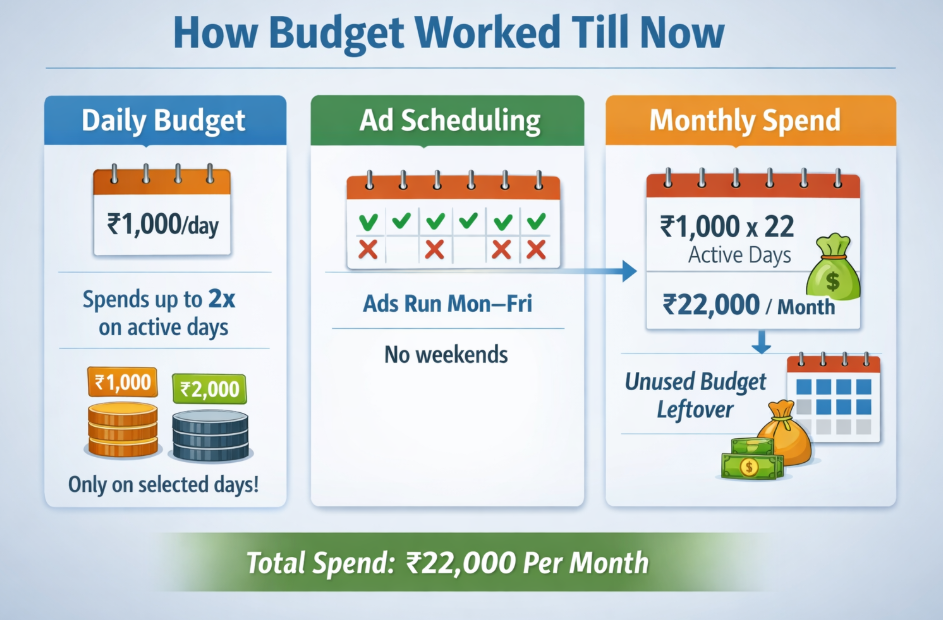
Let’s say you are a consultant in India. You set a daily budget of ₹1,000. You only want to show ads on weekdays (Monday–Friday) because that’s when you can answer the phone.
- Daily Budget: ₹1,000
- Active Days: ~22 days per month
- Your Expectation: You expect to spend roughly ₹22,000 per month.
- Old Reality: Google would spend around ₹1,000 (up to ₹2,000 on busy days) for those 22 days and leave the rest of the “monthly envelope” untouched.
The New Update: Proactive Pacing
Here is the shift: Google’s systems will now proactively attempt to spend up to your full 30.4x monthly limit, even if your Ad Schedule is restricted.
Google now views that “unspent” weekend money as fair game. If your ads are off on weekends, the system will push much harder during your active hours on weekdays to reach that 30.4x cap.
The “Post-March 1” Example (Same Consultant):
- Daily Budget: ₹1,000
- Monthly Spend Limit: ₹1,000 × 30.4 = ₹30,400
- Active Days: 22 days (Mon–Fri)
- New Reality: Google sees you have a ₹30,400 limit. Because it can spend up to 2x your daily budget (₹2,000) per day, it will try to “compress” that ₹30,400 into your 22 active days.
- The Result: You could end up spending ₹30,400 in a month where you previously spent ₹22,000. That’s a 38% increase in spend without you changing a single setting!
How Your Bidding Strategy Changes the Game

This update doesn’t hit everyone the same way. The impact depends heavily on your bidding “flavor.”
1. Maximize Conversions (No Target)
This is the “danger zone.” If you tell Google to “get as many conversions as possible” for your budget, the system will see this new headroom as an invitation to bid more aggressively.
- What happens: You might see your Cost-Per-Click (CPC) rise as the system bids higher to ensure it spends the full ₹2,000 daily allowance to hit that monthly cap.
2. Target CPA or Target ROAS
If you have an efficiency target (e.g., “I want leads at ₹500 each”), you have a built-in safety net.
- The Data: The system will still try to spend more, but it is restricted by your performance target. If it can’t find more leads at ₹500, it won’t just “burn” the money (usually). However, you should still expect a slight lift in spend as the algorithm gets more “brave” in auctions it might have skipped before.
| Scenario | Old Monthly Spend | New Potential Spend | Risk Level |
| Max Clicks/Conversions | ₹22,000 | ₹30,400 | High (Aggressive spending) |
| Target CPA (tCPA) | ₹22,000 | ₹24,000 – ₹26,000 | Medium (Limited by efficiency) |
What You Should Do Right Now
Don’t panic, but do audit. Here are three things to note:
- Do the Math: If you have a hard monthly limit, take that number and divide it by 30.4. Set that as your new daily budget. If you only want to spend ₹22,000 a month, your daily budget should actually be around ₹723, not ₹1,000.
- Watch your CPCs: Check if your cost-per-click is spiking during your active hours. This is a sign Google is over-bidding just to fill the budget.
- Check your Notifications: Google is rolling this out in waves. Check your email or the “Recommendations” tab in your account to see if your campaigns have been migrated to this new pacing logic.
The “set it and forget it” days of ad scheduling are over. Keep a close eye on your “Month-to-Date” spend over the next few weeks!
Frequently Asked Questions (FAQ)
1. Is Google increasing my daily budget automatically?
No.
Your daily budget remains the same.
What changed is how Google paces your budget during active days. It may now spend more aggressively within your schedule to reach the monthly cap (30.4× daily budget).
2. Will I be charged more than 30.4× my daily budget?
No.
Google still guarantees that you won’t be billed more than:
Daily Budget × 30.4
That monthly ceiling has not changed.
3. Does this mean ads will run outside my scheduled hours?
No.
If your ads are set to run only Monday–Friday, they will not run on weekends.
What changes is that Google may spend more during those active days.
4. Why is my monthly spend suddenly higher even though I didn’t change anything?
Because Google now tries to use your full monthly budget allowance — even if you restrict your ad schedule.
Earlier, unused days stayed unused.
Now, that budget may get “compressed” into your active days.
5. Who is most affected by this update?
Advertisers who:
- Run ads only during business hours
- Pause campaigns on weekends
- Use ad scheduling heavily
- Use “Maximize Conversions” without CPA limits
These accounts may see faster spending.
6. Which bidding strategy is safest under this update?
Target CPA (tCPA) and Target ROAS (tROAS) are safer because they have performance guardrails.
“Maximize Conversions” without a target is more aggressive and may increase CPCs and spend.
7. If I want to keep my monthly spend fixed, what should I do?
Reverse-calculate your daily budget.
Example:
If your monthly limit is ₹22,000:
₹22,000 ÷ 30.4 = ₹724
Set your daily budget around ₹720–₹750 instead of ₹1,000.
8. Is this change applied to all campaigns?
Google is rolling it out in phases.
Check:
- Account notifications
- Recommendations tab
- Month-to-date spend trends
If you notice faster pacing, your account is likely under the new logic.
9. Will my CPA increase because of this change?
It depends.
- With Maximize Conversions → CPA may fluctuate.
- With Target CPA → Google will try to maintain efficiency.
Watch your CPC and CPA trends closely in the first 30 days.
10. Should I panic?
No.
But you should monitor.
Keep a close eye on:
- Month-to-date spend
- Cost-per-click
- Impression share
- Cost per conversion
This update doesn’t change billing rules.
It changes pacing behavior.
And pacing affects performance.

Anil Singh is the Founder of Anirup Technologies LLP and a performance marketing strategist with over a decade of hands-on experience in Google Ads, PPC management, SEO and lead generation. He helps businesses build search-focused marketing systems that improve visibility, attract qualified leads and support measurable growth.
With strong expertise in Google Ads, Meta Ads, conversion tracking, landing pages and WordPress-based SEO, Anil focuses on practical strategies that connect marketing spend with real business outcomes. His work is especially focused on helping businesses use paid search and performance marketing with better structure, clearer reporting and stronger ROI accountability.